
CSS Minifier & Compressor
Our online CSS minification tool is designed for simplicity and efficiency. Just Paste your CSS code below to minify and compress it.
Original size: 0 bytes
Minified size: 0 bytes (0% smaller)
What is a CSS Minifier & Compressor?
A CSS Minification & Compression tool remove unnecessary comments, whitespace, redundant code etc. from your stylesheet and reduce file size.
How to Use the CSS Minify Tool
Paste your CSS into the “Original CSS” input box.
Click “Minify CSS” button to generate minified version.
Copy the minified output or clear all fields to start fresh.
Why Use this Online CSS Minify Tool?
- Fast & Efficient – Removes comments, whitespace, and unnecessary syntax.
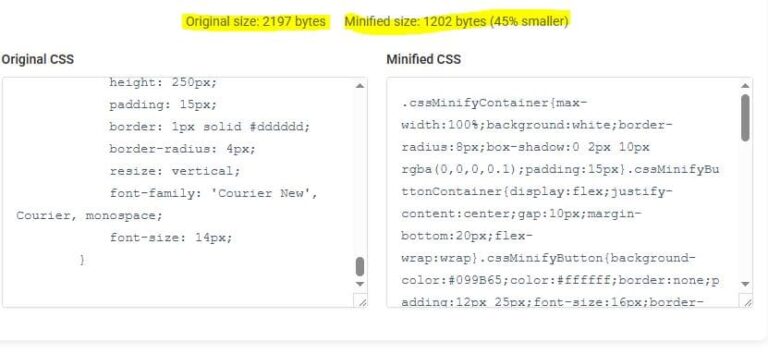
- Real-Time Stats – Shows original vs. minified size with savings percentage.
- 100% Client-Side – No server processing—your code stays private.
- Copy & Clear Options – Easily copy the minified output or reset all fields.
- Device-Friendly – Works seamlessly on all devices.
Example:
Frequently Asked Questions (FAQs)
1. Does minification break my CSS?
No, Absolutely not Minification only removes unnecessary characters—your styles remain fully functional.
2. Should I minify CSS in development or production?
Minify CSS file good for boost website speed and efficiency. Keep original CSS for easier debugging.
3. Does this tool store my CSS?
No, We don’t store any data. Processing happens in your local browser.